Wonderful Blog
Facebook Ad Size

Published March 13, 2026
Facebook Ad Size
Facebook ad size means the image and video dimensions Meta recommends per placement—Feed, Stories, Reels, right column, and others. Getting it wrong wastes creative and can hurt delivery. This post is scoped to specs and execution: minimum pixels, aspect ratios, and one reference table so you brief and build once. Out of scope: creative strategy, copy limits only, or non-Meta platforms—see meta-ads-updates-february-2026 and creative-strategist for that.
TL;DR
- One size does not fit all. Meta's recommended minimum image sizes vary by placement: Feed 1080×1080 or 1440×1800, Stories/Reels 1080×1080, right column 1200×1200. Use the highest resolution you have; these are minimums.
- Aspect ratio matters as much as pixels. Aspect ratios supported in Ads Manager define what crops; 1:1 and 4:5 cover most Feed; 9:16 for Stories/Reels. Design for the ratio, then export at or above minimum.
- Video: Same logic—resolution and ratio by placement. Meta Ads Guide has format-specific specs; check before you produce.
- Checklist below for briefing or QA: placement list, minimum size, ratio, safe zone. Stops wrong-size creative from going live.
- Out of scope: Creative concepting, copy limits in isolation, or TikTok/LinkedIn specs—see linkedin-carousel-ad-specs for LinkedIn.
Why Facebook Ad Size Actually Matters
Meta will scale or crop creative that doesn't match placement specs; the result is often cut-off text, bad framing, or weak delivery. Meta's guidance is clear: use the highest resolution available and treat documented sizes as minimums. Jon Loomer and performance teams treat ad specs as part of the brief—creative that's built to the right size and ratio from the start performs and iterates faster than creative that's fixed after the fact.
Recommended Sizes by Placement (Image)
| Placement | Minimum image size | Aspect ratio (common) |
|---|---|---|
| Facebook Feed | 1080×1080 (1:1) or 1440×1800 (4:5) | 1:1, 4:5 |
| Facebook right column | 1200×1200 | 1:1 |
| Facebook Marketplace | 1200×1200 | 1:1 |
| Facebook Stories / Reels | 1080×1080 | 9:16 typical for full-screen |
| Instagram Feed | 1080×1080 | 1:1, 4:5 |
| Instagram Stories / Reels | 1080×1080 | 9:16 |
| Messenger Stories | 1080×1080 | 9:16 |
| Messenger Inbox | 1200×1200 | 1:1 |
Source: Meta Business Help Center – recommended minimum image pixel requirements. For full design specs and updates, use the Meta Ads Guide.
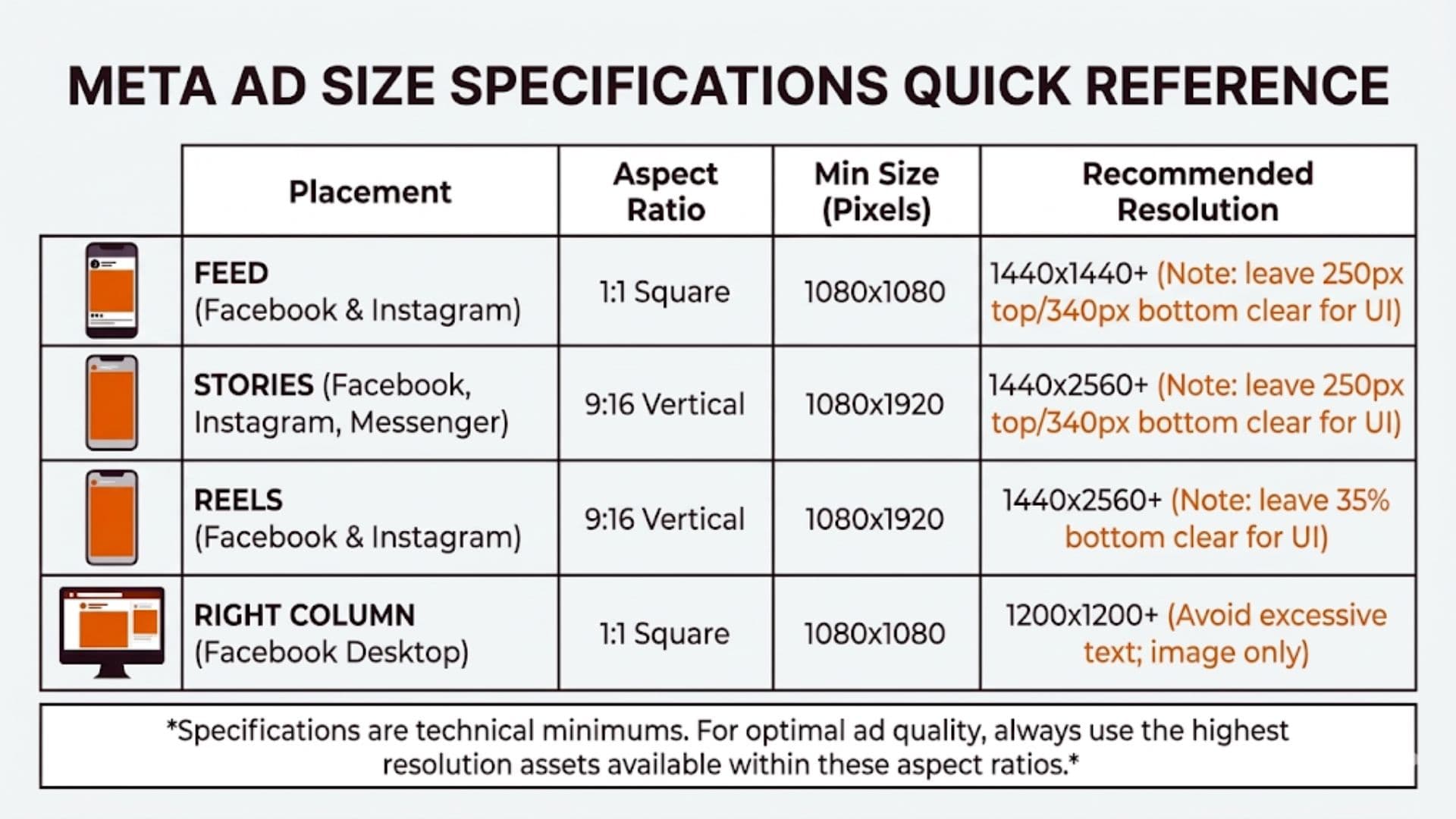
Video and Aspect Ratio
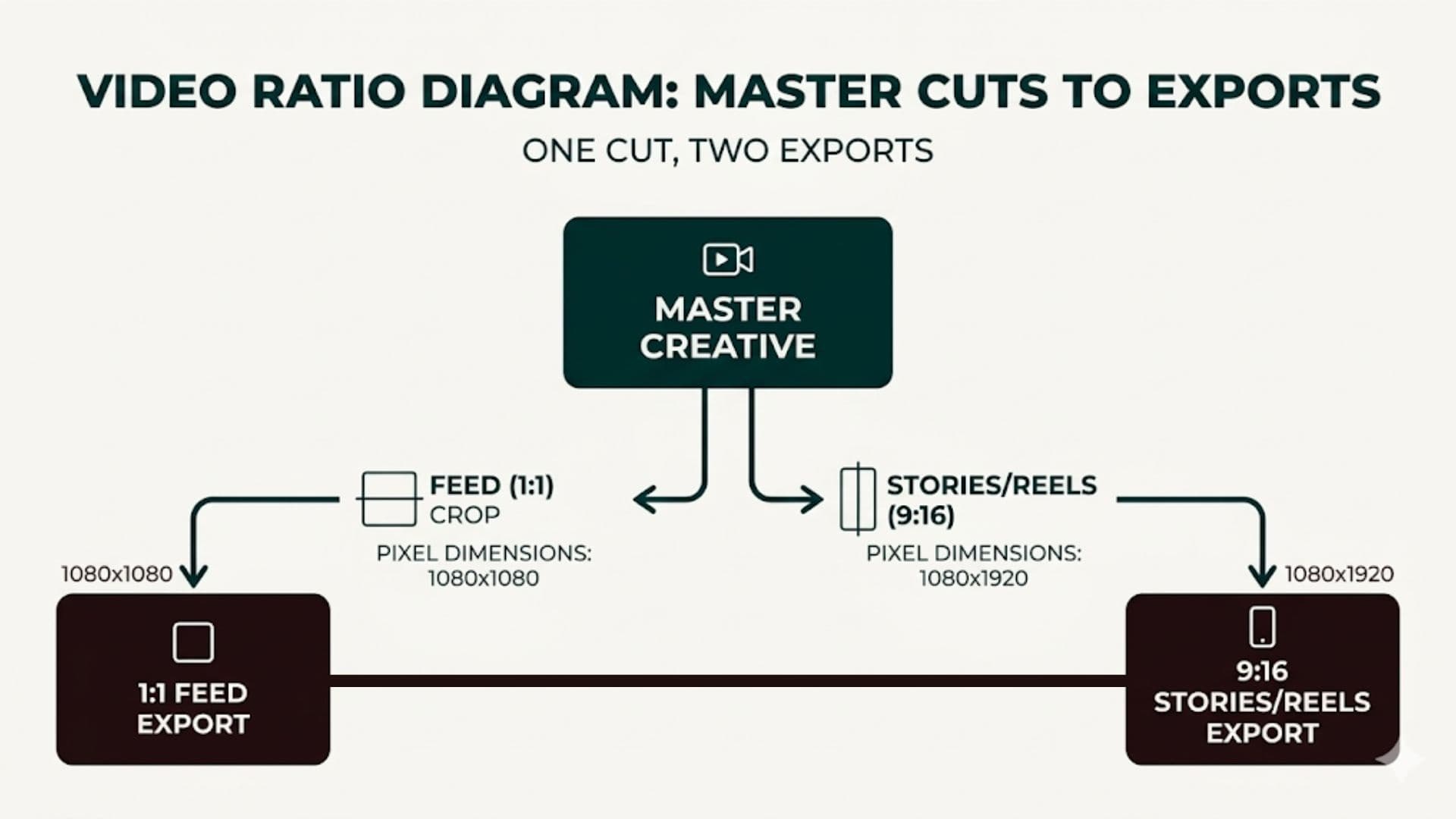
Video ad size follows the same idea: resolution and aspect ratio by placement. Meta's Ads Guide covers video length and dimensions per format. In practice: 1:1 (1080×1080) works across many Feed placements; 9:16 (1080×1920) for Stories and Reels. Common Thread Collective and similar shops often recommend building a small set of ratios (e.g. 1:1 and 9:16) and exporting at or above Meta's minimums so one cut can serve multiple placements without rework.
Facebook Ad Size Checklist (Brief or QA)
| Check | Why |
|---|---|
| List placements you're running | So you know which minimum sizes apply. |
| Min pixels met for each placement | Per Meta's minimums; avoid upscaling. |
| Aspect ratio matches placement | Prevents surprise crops; use supported ratios. |
| Critical content in safe zone | Text and key visual inside safe area so UI overlay doesn't hide it. |
| File type and weight within spec | Per Ads Guide for image/video. |
Use this when briefing creative or before upload. One person on the team should own "specs correct" so it's not an afterthought.
Real-World Example: One Asset Set, Multiple Placements
A DTC brand was shipping separate assets for Feed and Stories and missing Reels. They switched to two export ratios: 1:1 (1080×1080) for Feed and 9:16 (1080×1920) for Stories and Reels. Briefs now include the checklist above; the designer exports both from the same master. Upload time dropped and they stopped getting rejections or odd crops. Lesson: lock the placement list and minimum sizes in the brief, then build once and export to those specs.
Actionable Takeaway
Use Meta's recommended minimum image sizes and supported aspect ratios as the source of truth. Brief and QA with the placement table and checklist so every asset matches the placements you run. Auto-validate ad specs before publishing so size mismatches never make it to the platform. See real examples at every ad size in our creative library to understand what performs well in each format. For platform updates, see meta-ads-updates-february-2026; for who owns the brief and test plan, see creative-strategist.
Keeping specs in the brief and creative in one workflow reduces rework. Wonderful helps you create and test ad creatives faster so size and placement stay correct from the start.