Wonderful Blog
TikTok Ads Login
Login access only: no troubleshooting or workflow explanation.

Published March 6, 2026
TikTok Ads Login
You need to get into TikTok Ads Manager. This post is navigational only: where to log in, what URL to use, and how to land on the dashboard. No troubleshooting or workflow—just access.
TL;DR
- Direct URL: ads.tiktok.com — use this for TikTok Ads Manager.
- Account types: Log in with a TikTok for Business account (email or phone) or link a personal TikTok account.
- First time: Sign up at business.tiktok.com if you don't have a TikTok for Business account yet.
- Bookmark ads.tiktok.com so you skip search and go straight to the dashboard.
- Out of scope: Billing, campaign setup, or creative best practices—see TikTok's help center and our blog for related posts.
Where to Log In
TikTok Ads Manager is at ads.tiktok.com. That's the only URL you need for the ad dashboard. Avoid generic tiktok.com or tiktok.com/business—those can send you to the wrong place.
TikTok's official support states that advertisers should use the Ads Manager at that URL. If you're on a region-specific or partner portal, you may be redirected; the canonical entry point is still ads.tiktok.com.
Account Types
- TikTok for Business account: Created with work email (or phone). Use this for brand and team use; it's the standard for Ads Manager.
- Personal TikTok account: You can link or use it to access Ads Manager, but for teams and multiple users, a Business account is recommended.
If you don't have a TikTok for Business account, create one at business.tiktok.com. From there you can go to "Advertise" or go directly to ads.tiktok.com to log in.
Getting to the Dashboard
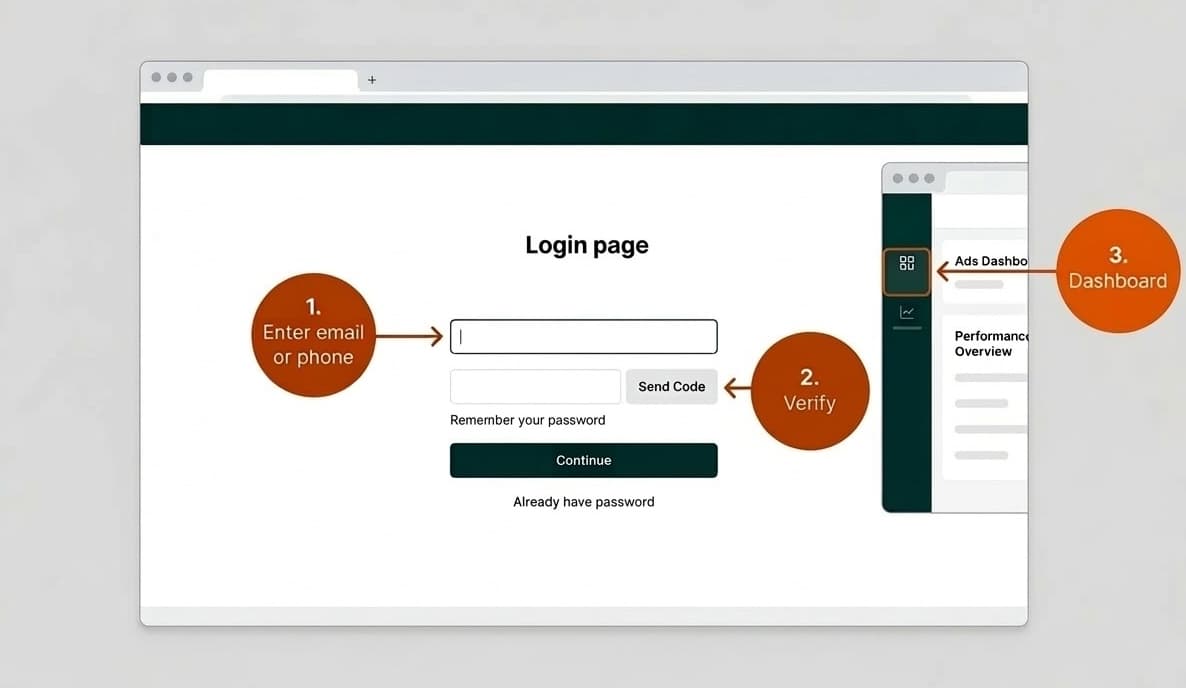
- Go to ads.tiktok.com.
- Enter the email or phone associated with your TikTok for Business account.
- Complete verification (code or password, depending on your setup).
- You'll land in the Ads Manager dashboard—overview, campaigns, assets, and billing are available from the main navigation.
No extra steps for "activating" ads; once you're in, you can create campaigns (subject to account and billing approval).
Actionable Takeaway
Bookmark ads.tiktok.com and use it as your TikTok Ads login. Create a TikTok for Business account at business.tiktok.com if you don't have one. For campaign setup, creative, and strategy, see TikTok's help center and our blog for related posts.
Once you're in the dashboard, you can start publishing ads. To manage ad publishing from a single workspace, keep creative and reporting in one place. Wonderful connects your TikTok workflow with assets and approvals so you can move from brief to launch without tab overload.
For creative inspiration and templates, see our guide on TikTok ad templates.