Wonderful Blog
How to Track Purchases on Facebook Ads

Published March 15, 2026
How to Track Purchases on Facebook Ads
Most “purchase tracking” posts either stop at setup screenshots or jump straight into attribution theory. This post stays focused on one job: making sure your purchase event that fuels optimization is actually reliable.
If you use Meta Pixel and Conversions API (CAPI), the work is the same every time: confirm events fire, confirm deduping works, and confirm that Events Manager matches your real purchase flow well enough to trust optimization.
TL;DR
- Validate the purchase event, not just the integration. Your goal is trustworthy purchase counts for optimization, not “Pixel is installed.”
- Use a Pixel + CAPI QA checklist. Browser + server signals can drift; your validation should catch drift and duplicates.
- Test with realistic actions. Test events are useful, but you also need a quick sanity check against real orders.
- Keep it scoped to purchases. Don't expand into full attribution frameworks; validate the signal first.
Meta also documents how to inspect and validate events across browser and server paths in Events Manager, including event coverage, matching quality, and deduplication behavior. For reference: View server event details in Meta Events Manager and About Deduplication for Meta Pixel and Conversions API Events.
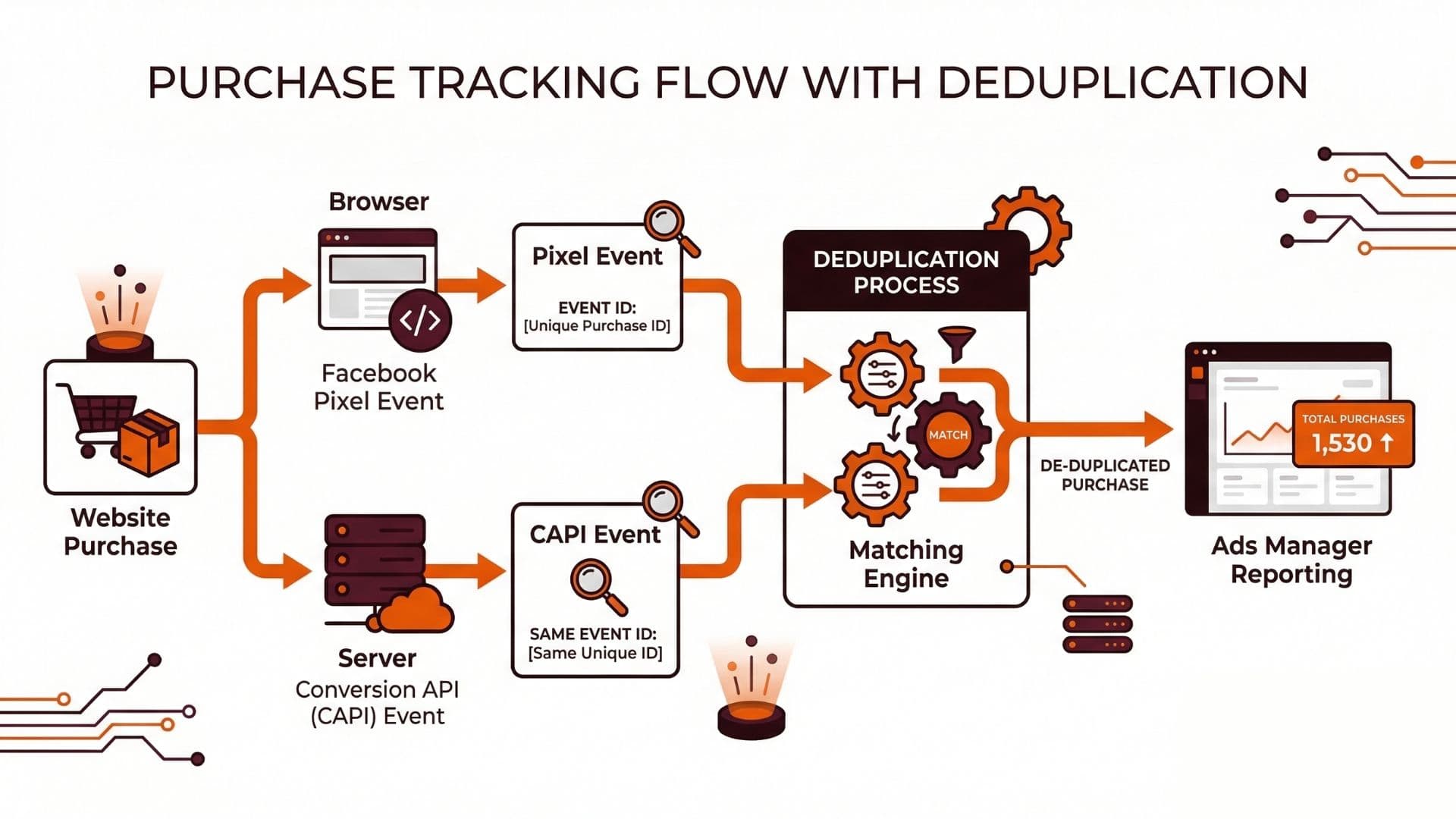
What You Must Confirm (Purchase Tracking Only)
To trust purchase tracking, you need to confirm four things:
- The browser side fires the right event. Your purchase action triggers the
Purchaseevent with the required key fields (at minimum: event name + value/currency, plus the fields you are using for match). - The server side sends an equivalent purchase event. CAPI receives a purchase event payload that is consistent with your Pixel event (same logical meaning, same identifiers strategy).
- Deduplication is not “broken but silent.” If both Pixel and CAPI fire for the same purchase and deduping isn't working as expected, optimization can be misled by duplicate signals.
- Events Manager reflects reality enough to optimize. You do not need perfect reporting parity, but you need confidence that major mismatches (or duplicates) do not exist.
A Purchase Validation Workflow (Step-by-Step)
1. Start with event consistency (names + parameters)
Before you look at numbers, confirm the shape of the events:
- The Pixel event and the CAPI event represent the same purchase moment.
- Currency and value are consistent (or consistently transformed) across browser and server.
- Identifiers used for matching (whatever you configured) are present in both payloads for the same user/order.
If you skip this, you can pass technical tests but fail measurement because one side is effectively tracking a different “purchase.”
2. Test events end-to-end (not just “Test Events” button)
Perform a purchase test where you can observe each stage:
- Confirm your purchase action fires on the browser.
- Confirm your server event is received for that same action.
- Confirm the event appears in Meta Events Manager.
Then check for duplicates. The important question is not whether two events appear, but whether Meta treats them as one logical purchase.
3. Validate deduping with a single test purchase
Do one controlled purchase:
- If deduping is correct, Meta should not effectively count the same purchase twice for optimization.
- If deduping is wrong, you may see inflated purchase volume or inconsistent reporting between browser and server paths.
This is where “it seems to work” stops being enough. Your validation should answer: is each real purchase producing exactly one optimized signal?
4. Do a lightweight real-world sanity check
After you pass the technical checks, do a quick comparison:
- Pull a small window of real orders from your ecommerce system.
- Compare purchase event appearance and timing in Events Manager.
Don't expect perfect equality day one. Data latency, batching, and attribution windows can introduce differences. The goal is to detect major problems like “almost no purchases are showing” or “purchases are doubled.”
Purchase Tracking Checklist (Use This Before Scaling Spend)
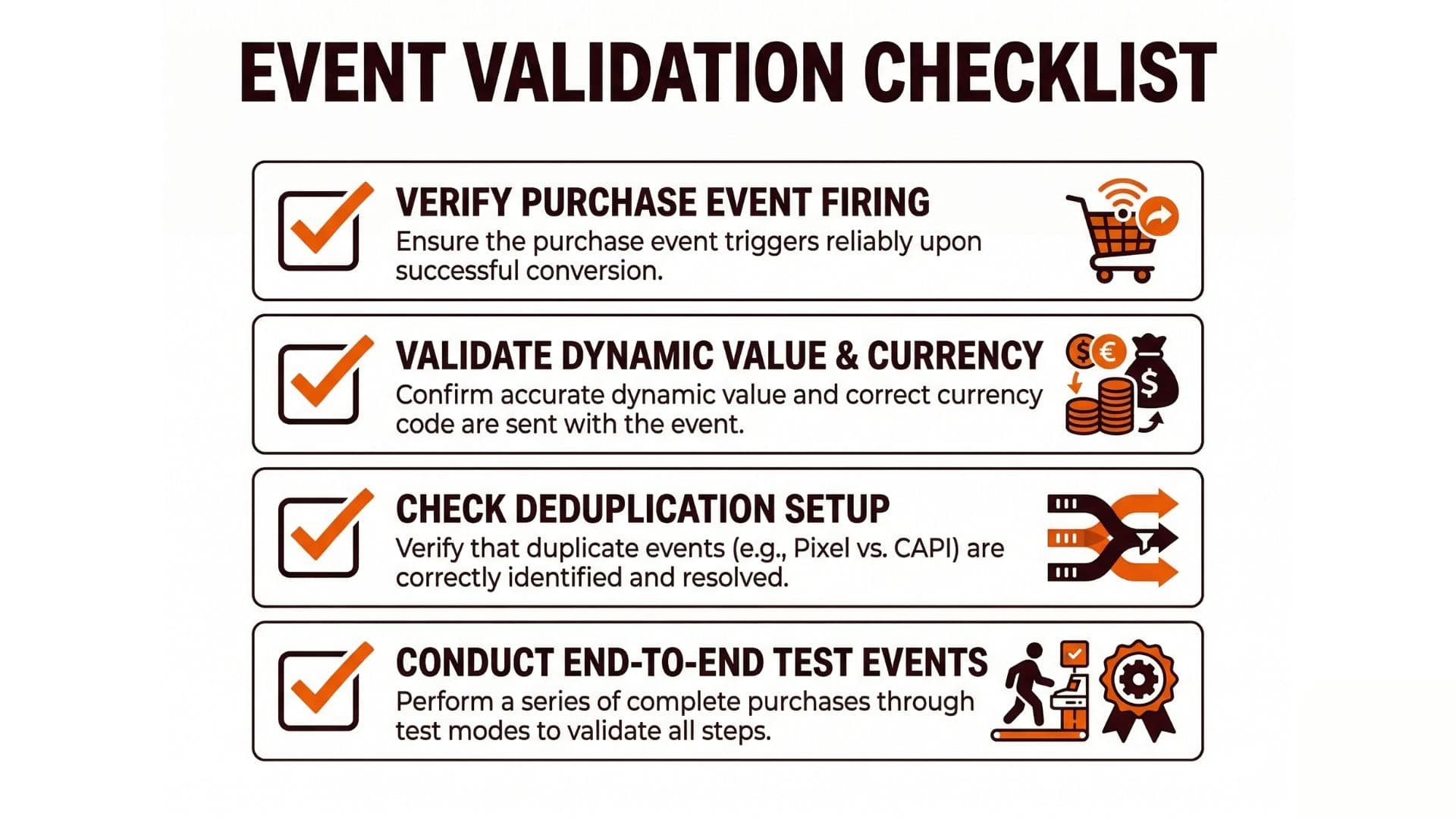
When you are ready to scale, run the checklist:
- Pixel purchase event fires correctly on the purchase confirmation flow.
- CAPI purchase event is sent for the same purchase logic (value/currency + identifiers).
- Deduping behavior is consistent (no duplicate optimization signals).
- Events Manager purchase event appears with the expected frequency for real actions.
- A small real-world order comparison shows no obvious duplication or major undercounting.
What Goes Wrong (Common Failure Modes)
Here are the measurement issues that most often corrupt purchase tracking:
- Browser and server are out of sync. One side fires for a different moment than the other.
- Deduping misconfiguration. You get duplicates that look like “good performance” until scaling makes the mismatch worse.
- Missing or inconsistent matching fields. Events arrive but cannot be matched with enough quality.
- Value/currency drift. The purchase signal looks “present” but optimization learns the wrong objective.
Actionable Takeaway
If you want purchase tracking you can trust:
- Validate event consistency first.
- Test a single purchase end-to-end (Pixel + CAPI + Events Manager).
- Confirm deduping behavior.
- Do a lightweight order sanity check.
Once your purchase signal is trustworthy, your delivery and learning behavior becomes easier to interpret. End-to-end tracking from creative to conversion keeps measurement aligned with your publishing workflow. For how learning and minimum volume can affect optimization, see Meta Ads Learning Phase 50 Conversions Per Week Help Center. For budgeting that respects learning, use Facebook Ad Budget Calculator. Related reading on attribution changes: Meta Attribution Update Click Through Engagement and Scaling Meta Ad Spend.
If you want a workflow that keeps creative and measurement aligned, Wonderful can help connect approvals and creative production so your purchase optimization isn't fighting avoidable ops churn.
Soft CTA
Wonderful can help you turn purchase tracking QA into an operational rhythm by keeping briefs, creative iterations, and approvals connected.