Wonderful Blog
Facebook Ad Automation Tool

Published March 16, 2026
Facebook Ad Automation Tool
Automation is great for throughput, but it's also great at causing invisible damage when you let it run without approval gates. The goal isn't "more automation." The goal is automation with constraints: who can change what, when, and after what evidence.
This post focuses on selecting the right automation approach and designing a workflow around it. It is not a generic AI tool list and it is not an Ads Manager "how to set up campaigns" guide.
TL;DR
- Automate the boring, bounded steps: scheduling, routing, first-draft generation, bulk updates, and report exports.
- Keep human gates: strategy, final creative approval, and "publish" actions stay human.
- Compare automation tools by workflow output: what they produce and where they hand off next.
- Use rules as guardrails: Meta's automated rules can notify or apply actions based on conditions, but you should still design approval/ops workflow around them.
First Decide: What Are You Actually Automating?
Before you evaluate tools, define the boundaries:
- Inbound automation: briefs, product info, and assets entering your workflow.
- Creative automation: generating variants, formatting, and assembling final files.
- Operational automation: moving files into approvals, scheduling exports, and syncing status.
- Publishing automation: pushing approved assets into Ads Manager (or your ad ops pipeline).
If a tool blurs these boundaries, you won't know where mistakes originate. That's how you end up with "automation" that can't be debugged.
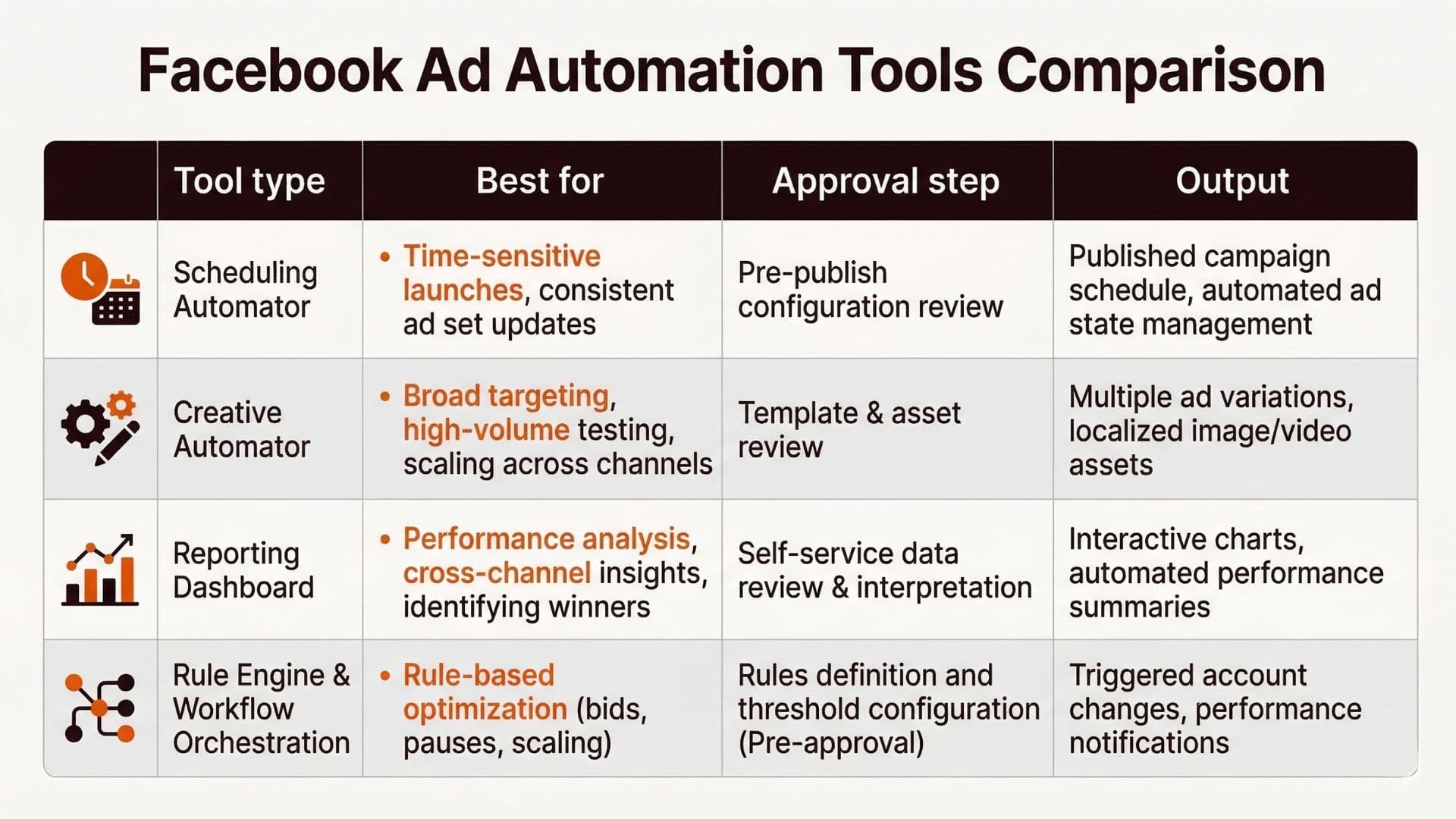
Tool Selection Framework: Compare by Output + Approval Gate
Most tool lists fail because they compare features, not outcomes. A better comparison uses two dimensions:
- What is the output? (files, messages, scheduled actions, report exports)
- Where is the approval gate? (human sign-off before publish vs automated publish)
Use this checklist:
| Step | Ask this question | Pass criteria |
|---|---|---|
| Inbound | Does the tool connect to your current source-of-truth? | It ingests briefs/assets reliably, with versions. |
| Creative | Does automation create draft outputs only? | Human can review before publish. |
| Ops | Can it route approvals and status? | Your team sees "what changed" and "what is approved." |
| Publish | Can you prevent accidental publishing? | Approval or conditions prevent uncontrolled publishes. |
| Reporting | Does it feed the dashboard you use to decide? | Reports align with your KPI definitions and cadence. |
For built-in Ads Manager automation patterns, Meta's documentation on editing automated rules illustrates how rules can apply actions when conditions are met, with notification settings and access expectations. (Edit an automated rule; About Automated Rules Templates)
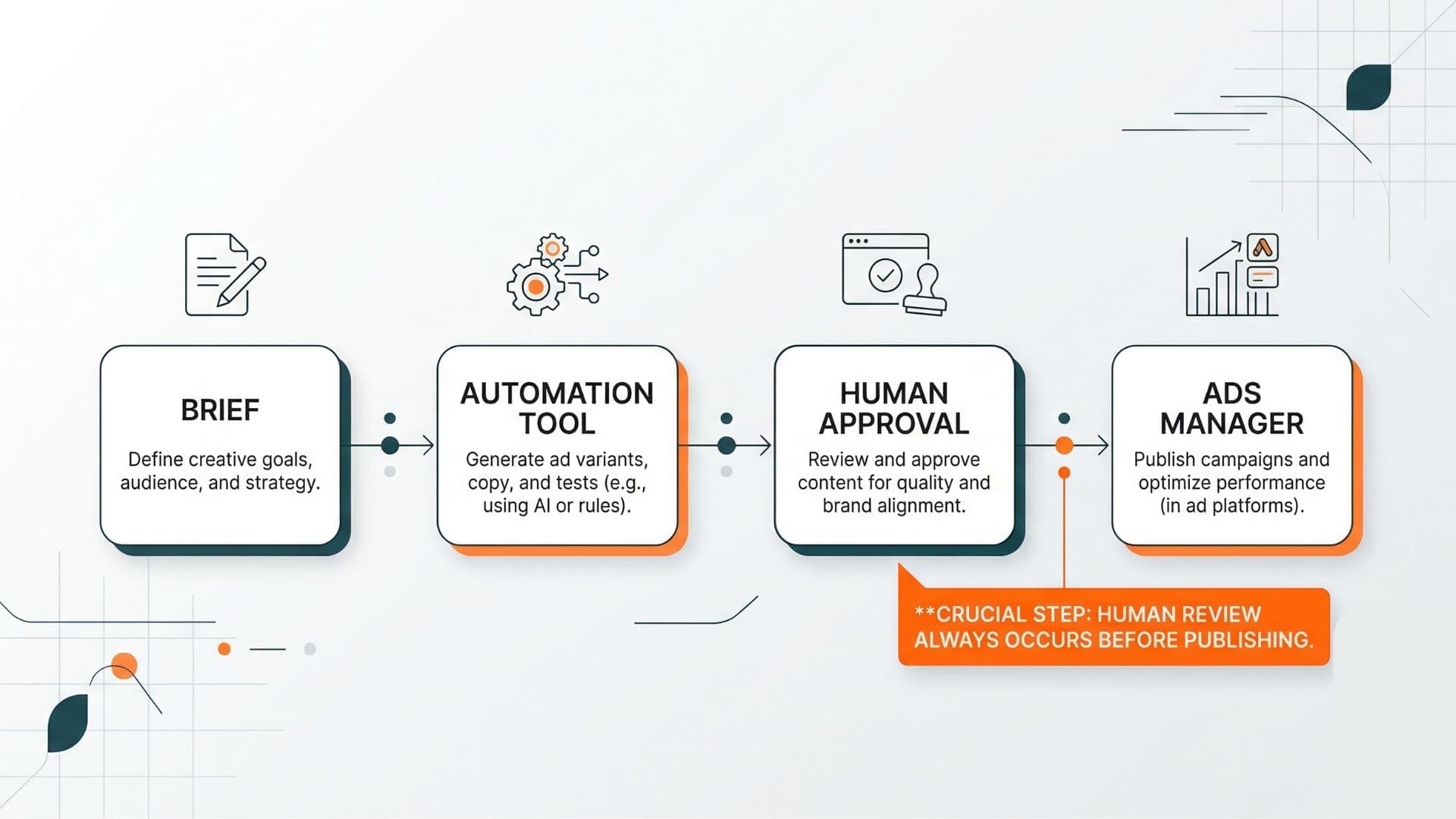
Workflow Blueprint: Brief -> Automation -> Human Approval -> Ads Manager
Design automation like this:
- Brief (inputs): campaign goal, audience constraints, compliance rules, and asset list.
- Automation step: tool generates drafts and/or formatted assets, or exports data needed for reporting.
- Human approval gate: review the outputs against brand, compliance, and the specific "go/no-go" decision.
- Ads Manager handoff: publish only approved assets or apply safe structured updates.
Meta Rules as a Guardrail (Not a Replacement for Ops)
Meta automated rules can reduce manual work when the condition->action mapping is stable. For example:
- notify a human when performance degrades beyond a threshold
- pause ad sets when frequency or delivery patterns become inconsistent
- schedule budget changes in controlled windows
But rules don't solve the human problem: deciding why something is happening. Treat rules as guardrails and notifications, not as strategy.
Real-World Example: Reducing Rework by Splitting Drafts vs Publish
One creative ops team ran an automated "draft -> export -> upload" workflow. It saved time, but it also created rework because uploads happened before final compliance checks.
They fixed it with two changes:
- Draft exports only: the automation tool generated final-format files but stopped short of publish.
- Approval queue first: humans approved a batch and only then triggered the publish step.
After the change, the rework rate dropped because every upload corresponded to a documented approval decision. The dashboard also became easier to interpret because the "change log" was clean.
Actionable Takeaway
When you choose an ad automation tool, compare it by:
- Output type (draft, export, routing, report)
- Where the human approval gate lives
- How versioning and change visibility works
- How safely publishing is triggered
Then design your workflow around those constraints: automate drafts and routing, and keep publish decisions human-driven. Wonderful's Workflow product helps you automate your ad publishing workflow with built-in approval gates.
For workflow background on mapping stages and gates, see AI Ad Workflow and AI Tools for Media Buyers. For platform-level context on delivery and learning volatility, see Meta Ads Learning Phase 50 Conversions Per Week Help Center.
Soft CTA
If you want automation that improves throughput without losing clarity, Wonderful's Ad Launcher can help you automate your ad publishing workflow while maintaining approval gates. You can also explore Wonderful's full workflow automation for creative teams to connect briefs, drafts, approvals, and exports so your team doesn't guess what was changed.