Wonderful Blog
AI Landing Page Generator

Published March 8, 2026
AI Landing Page Generator
An AI landing page generator can speed up drafts, but it cannot replace page strategy or quality control. If you want output you can ship, you need to evaluate the generator by what it produces and how editing + approval works.
This post focuses on generator selection and workflow: what to check, how to keep human review obvious, and how to make AI drafts reliably on-brand.
TL;DR
- Use the generator for drafts and structure. Don’t outsource decisions you should own.
- Check design control and editing flexibility. If you cannot adjust layout and messaging, you will spend time rewriting anyway.
- Ensure collaboration and approval are straightforward. The workflow should make it obvious what’s approved.
- Verify publish/export options. You should be able to move output into your site process safely.
Even if the generator is “smart,” the page still needs to meet user experience basics. For reference on page experience signals, see Google page experience guidance.
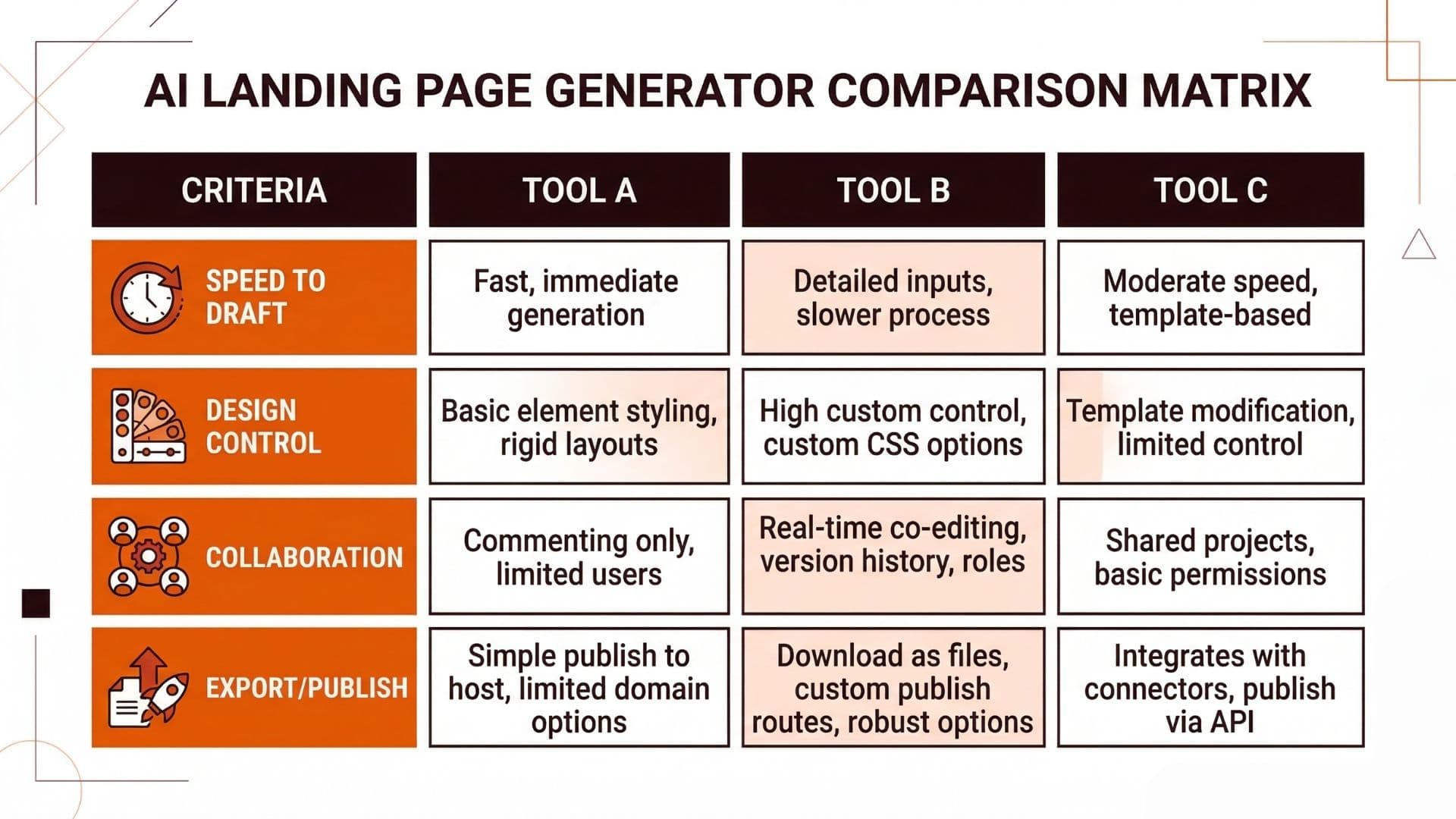
What to Evaluate (So You Don’t Buy “Magic”)
When you compare AI landing page generators, compare them by these outputs:
- Speed to a useful first draft: not just how fast it responds, but how complete the structure is.
- Design control: can you adjust hierarchy, sections, and CTA placement without fighting the tool?
- Collaboration: does it support review workflows your team can actually use?
- Export/publish: what formats does it produce, and how safely does it fit your website process?
The best tool is the one that reduces rework for your workflow, not the one with the most features.
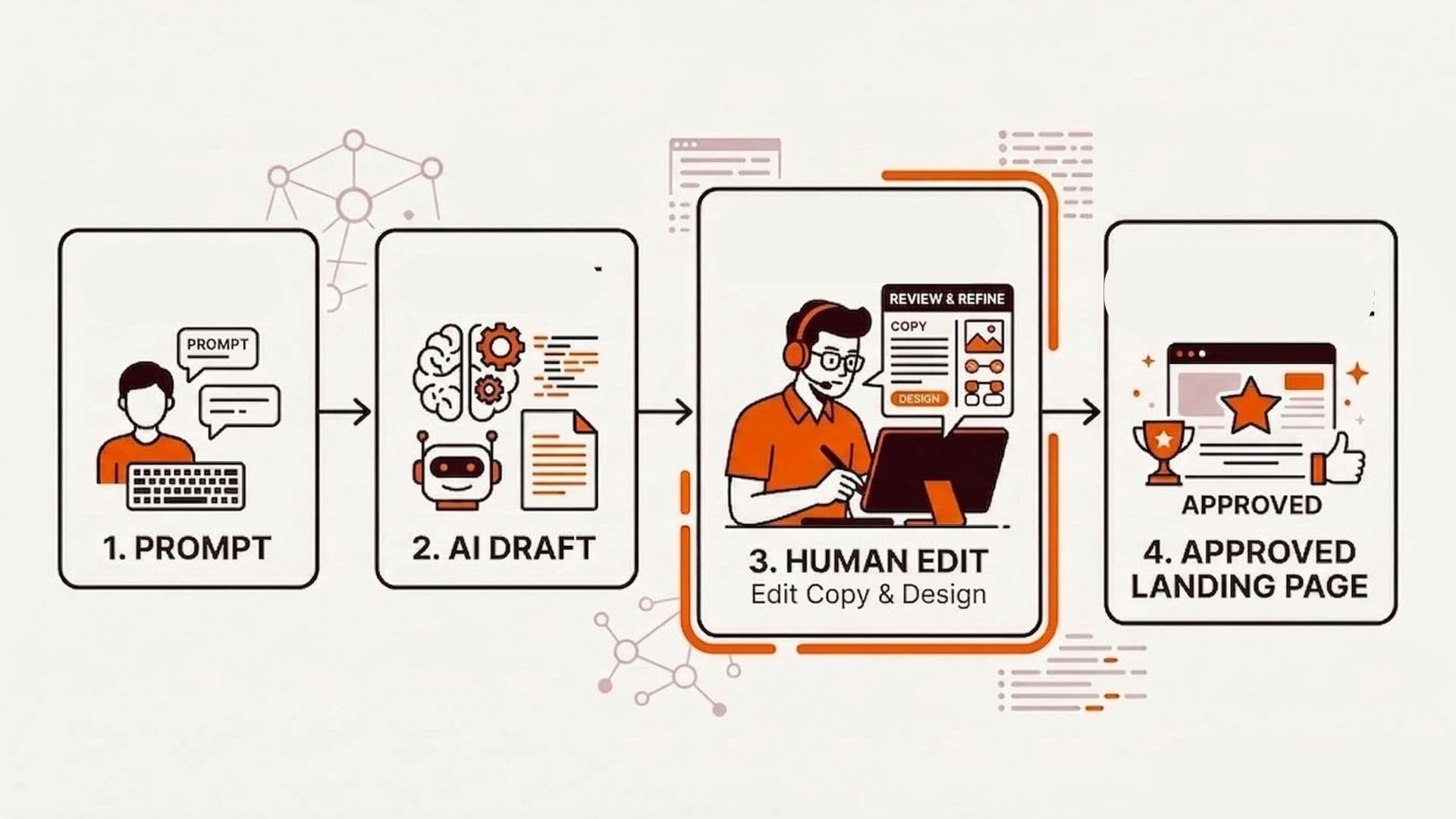
The Workflow: Prompt -> Draft -> Human Edit -> Approved Page
Use a workflow like this:
- Prompt: provide audience, offer, page goal (signup/demo/request), and brand constraints.
- AI draft: generate a page structure with matching sections and a suggested CTA path.
- Human edit: adjust message match, proof placement, and final CTA wording.
- Approval: approve a version that can be exported/published.
If your workflow doesn't separate “draft” from “approved,” you’ll ship inconsistent pages.
Internal Links
For page structure patterns and CTA clarity, see SaaS Landing Page and Colorful Web Design Landing Page Inspiration. Nova AI can assist with AI-powered landing page copy and briefs, while Wonderful's landing page library provides inspiration from top DTC brands.
A Prompt Template You Can Reuse
If you want the generator to produce something you can actually edit (instead of rewriting everything), include your constraints in the prompt.
Here is a reusable template:
Draft a B2B landing page for:
Goal: [signup / request demo / start trial]
Audience: [who exactly]
Offer: [what they get]
Primary CTA text: [exact button text]
Proof: [logos / outcomes / credibility]
Brand voice: [2-3 adjectives]

Page structure (must follow):
1) Hero: headline + 1 sentence subline + primary CTA
2) Proof section (short)
3) Benefits / how it works (3-5 bullets)
4) FAQ (3 questions)
5) Final CTA (same CTA as hero)

Rules:
- One primary CTA only (no competing buttons above the fold).
- Keep claims specific; avoid generic marketing phrases.
- Output in section-by-section headings with copy under each heading.
If the generator ignores the “one primary CTA only” rule or produces extra competing CTAs, it’s a generator workflow mismatch for your process.
Actionable Takeaway
Pick an AI landing page generator by design control + collaboration + export/publish safety, then use a draft-to-approval workflow. That keeps speed while protecting conversion quality.
Soft CTA
Wonderful helps teams keep landing page creative, approvals, and asset workflows aligned so AI drafts become real pages with fewer handoffs. Learn more about SaaS Landing Page patterns and Landing Page Inspiration to inform your AI-generated drafts.